I’m getting more and more into data engineering these days and having used R for a long time, I’m seeing a lot of problems that look nail-shaped to my R-shaped hammer. The available tools to solve those problems exist for (presumably) very good reasons, so I wanted to take some time to dig into how to use them and compare their workflows to what I would otherwise naively do in R.
I should mention here that I’m currently open to data/code-related opportunities and am actively seeking a new role – if your organisation is looking for someone aligned with my skillset, please get in touch with me any way you can, e.g. contact at jcarroll.com.au.
I’m a firm believer in “you learn with your hands, not with your eyes” so I wanted to actually build something. I definitely could spin up Claude Code and have it produce the entire thing for me – and in a different project I might do that – but in this case I want to make the mistakes myself so I can learn where the complexity really lives and where my prior assumptions are misaligned. I did have Claude (the chat version, not the full coding agent) guide me through the steps to get this project running, and I did let it clean up my SQL; this project wasn’t about learning to better optimise my SQL, but understanding exactly what it produced will help me write a better version on my next iteration.
Thinking of a real-world project I could take for a spin, I decided to build some ingestion for my personal finances. I’ve used Quickbooks previously which connects up to my bank and helps categorise personal and business (as a freelance contractor) expenses. I decided I’ll build my own ‘slowbooks’ processing workflow based on some manual exports (I don’t think my bank has an API).
Both of the approaches I’ll compare here build on the idea of a Makefile which
connects up commands to run based on dependencies, and only runs what is needed;
if all the input dependencies of a step have not changed, there’s no need to
re-run that step. From what I understand, you could largely get away with just
writing some Makefiles (or the newer implementation
just) but these two approaches help to better
structure how that’s constructed.
This is a somewhat longer post than some of mine, so here’s some quick links to the sections
dbt
One tool that comes up frequently is ‘data build tool’ most commonly referred to as just dbt, though that full name doesn’t even show up on their website. Started in 2016, it’s released as a Python package (dbt-core) though if you do try to just install something called ‘dbt’ you get the cloud CLI tool which isn’t quite the same. Naming stuff is hard.
It’s a way to write code you can commit, which translates to SQL and performs data ingestion, processing, transformation, and storage in a structured way with relationships between various steps in the workflow. It adds macros on top of plain SQL to make the transformations easier, written in jinja, a template engine which enables writing something more like Python within SQL.
This episode of Data Science Lab from Posit walks through an example of using dbt, and while it’s a fantastic overview of what a project looks like, it can’t answer all of the ‘how would I do that?’ problems that will come up in a different project.
Like they did, I will use DuckDB for a database - I enjoyed reading through ‘DuckDB in Action’ with the DSLC.io book club and can definitely see the advantages over SQLite which I would previously have reached for in this case.
I installed dbt via uv - the
official instructions use pip
and I’ve been burned too many times with that tool; uv is much nicer.
Nonetheless, I still encountered Python-related issues because it looks like
dbt doesn’t yet support Python 3.14 and yet this isn’t mentioned in their
instructions either. I got it working with this command, adding the dbt-duckdb
extension I plan to use, as well as streamlit to make a dashboard later
uv init slowbooks --python 3.12
cd slowbooks
uv add dbt-duckdb duckdb streamlit
Adding a profiles.yml in the project root defining the database (DuckDB) I
want to produce to store the tables
slowbooks:
  target: dev
  outputs:
    dev:
      type: duckdb
      path: slowbooks.duckdb
      schema: main
I can then initialise the project with
uv run dbt init . --skip-profile-setup
This creates the basic project structure, and there’s a lot going on.
I also needed to define a dependency in packages.yml so that I could use the
macros
packages:
  - package: dbt-labs/dbt_utils
    version: [">=1.0.0"]
and ran
uv run dbt deps
I put my exported CSVs (several for my transaction/savings accounts and one for
my credit card) in a new raw/ folder; my understanding is that the seeds/
folder is for static data, although that’s the folder used in the Posit tutorial
above.
I also ran some pre-processing over my CSVs to categorise the merchants. My bank provides a ‘category’ and ‘subcategory’ for each item, but I wanted to be able to override some of those to more specific definitions so that I could group by them, e.g. ’total spent on books’ since I mainly buy those from just a couple of merchants. This produced a new CSV of patterns, resolved names, and classifications, since the ‘description’ of an item in my transactions might have, e.g.
Paypal *FruitShop 0401000000 Au
and I want to identify the ‘FruitShop’ part, so I can match against that pattern.
This is a (fairly) static file (the source data will occasionally be extended),
so that did go into seeds/.
{targets}
The whole time I’ve been learning about dbt I’ve had a voice in my head asking “can’t I just use {targets}?” Yes, it’s an R-specific tool, but it does a fantastic job at what it does. It’s not a new tool at all – this post from 2021 demonstrates the power of it, and Miles McBain has been singing the praises of it since at least as early as 2020 (along with the predecessor {drake}).
Rather than double up all of my inputs, I will just keep the {targets} implementation as a subdirectory of my dbt project and refer to the exact same source files. I will create a distinct database, though.
Installing {targets}, provided you already have a working R installation, is as straightforward as
install.packages("targets")
within an R session, be that in RStudio, Positron, Emacs, or a terminal.
As for the rest of the file structure, 100% of the R code here goes into a
_targets.R file - much cleaner, albeit that’s a tradeoff in terms of separating
different components.
Comparing Workflows
For the actual processing I’m going to show both dbt and {targets} approaches in tabsets for switching back and forth.
For dbt a ‘model’ is a select statement producing a table, with the structure being
models split out into three layers of increasingly production-ready data. From
the dbt docs, these are defined as:
- Staging: Preparing atomic building blocks
- Intermediate: Purpose-built transformation steps
- Marts: Business-defined entities
and I’m trying to stick to that as best as I can.
Staging - Load Data
The first step was to ingest that into a ‘staging’ model. This is where the initial data loading happens. For this personal project I’ve exported the CSV files I need, and will do so again in the future, adding them to the same folder for de-duplication within the pipeline. In a more mature project these might be read from an API or a connection to a managed database, and both approaches can easily switch between different ’environments’ (dev, staging, prod, …) without adjusting much, certainly without having to rename all the dependency labels.
-

First I defined the sources in
models/staging/sources.yml, leveraging DuckDB’sread_csv()to read all the CSV files inraw/version: 2 sources: - name: all_raw schema: main meta: external_location: "read_csv('raw/*.csv', filename=true, union_by_name=true, header=true)" tables: - name: all_transactions description: "All raw CSV exports"Reading in these files occurs in a model
models/staging/stg_bank.sqlandmodels/staging/stg_cc.sql, the first of which iswith source as ( select * from {{ source('all_raw', 'all_transactions') }} ), filtered as ( select * from source where filename not like '%visa_%' ), cleaned as ( select -- Parse YYYYMMDD integer date format strptime(cast("Date" as varchar), '%Y%m%d')::date as date, -- Collapse whitespace runs in description regexp_replace(trim("Description"), '\s+', ' ', 'g') as description, -- Debit = spend (positive), Credit = refund/income (negative) coalesce("Debit", 0) - coalesce("Credit", 0) as amount_aud, "Category" as raw_category, "SubCategory" as raw_subcategory, filename as raw_source from filtered where "Date" is not null ) select * from cleanedWith a similar model for the credit card data. I’ve separated these based on matching to
'visa'in the filename, and I’ve named my files according to this.These are then combined in
models/staging/stg_transactions.sql, referencing each of the dependencies with theref()macro. A ‘surrogate key’ is created to uniquely identify rows, so that when I add more data, the duplicates will drop out. This does mean that any intentional duplicates: double records on the same date from the same merchant for the same amount – e.g. buying one ice-cream, dropping it, buying another – will also be dropped, but I’m considering that an edge-case and not worrying about it.with bank as ( select * from {{ ref('stg_bank') }} ), cc as ( select * from {{ ref('stg_cc') }} ), unioned as ( select * from bank union all select * from cc ), with_surrogate_key as ( select {{ dbt_utils.generate_surrogate_key(['date', 'description', 'amount_aud']) }} as transaction_id, date, description, amount_aud, raw_category, raw_subcategory, raw_source from unioned where "Description" not ilike '%Internet Withdrawal%' -- drop transfers between accounts -- this does include manual payments, but most of these are small ) select * from with_surrogate_keyI’ve also stripped out the ‘internet withdrawal’ records as these are mostly transfers between my own accounts. It also includes manual transfers to e.g. contractors or even some bills, but dealing with these didn’t seem worth the effort.
One point worth noting here is that this processing is all in SQL; I definitely got the feeling after working with this tool that it was made for data folks who naturally reach for SQL when working with data. Personally, I prefer an abstraction on top of my SQL, so this felt limiting to me, but tastes will absolutely differ.
The merchants seed file is automatically loaded with the name
seed_merchantsmatching the file name. -
The equivalent in {targets} uses
tar_target()to identify dependencies and things to be output. I start by identifying the files I want to read in. A strict comparison would have been to do anothergrepv()withinvert=TRUEbutsetdiff()works nicely hereRAW_DIR <- "../raw" file_list <- list.files(RAW_DIR, full.names = TRUE) cc_list <- grepv("visa.*\\.csv$", file_list) bank_list <- setdiff(file_list, cc_list)(sidenote: ooh, yeah – I get to use that new
grepv()added in R 4.5.0)Loading the data requires a function, but now we can leverage R and its abstractions, in this case {dplyr}, {stringr}, and {lubridate}
stage_source <- function(files) {
  read_files(files) |>
    mutate(
      date = ymd(as.character(Date)),
      # Collapse whitespace runs — mirrors regexp_replace(trim(Description), '\s+', ' ', 'g')
      description = str_squish(Description),
      # Debit = spend (positive), Credit = refund/income (negative)
      amount_aud = coalesce(Debit, 0) - coalesce(Credit, 0),
      raw_category = Category,
      raw_subcategory = SubCategory,
      raw_source = filename
    ) |>
    filter(!is.na(Date)) |>
    select(
      date,
      description,
      amount_aud,
      raw_category,
      raw_subcategory,
      raw_source
    )
}
and combining the sources along with filtering out the transfers
stg_transactions <- function(bank, cc) {
  bind_rows(bank, cc) |>
    # Drop inter-account transfers — mirrors WHERE description NOT ILIKE '%Internet Withdrawal%'
    filter(!str_detect(str_to_lower(description), "internet withdrawal")) |>
    surrogate_key(c("date", "description", "amount_aud")) |>
    select(
      transaction_id,
      date,
      description,
      amount_aud,
      raw_category,
      raw_subcategory,
      raw_source
    )
}
The
surrogate_keyfunction is something I did have to define, but Claude happily provided me with an equivalent to what’s in dbtsurrogate_key <- function(df, cols) { df |> mutate( transaction_id = purrr::pmap_chr(pick(all_of(cols)), \(...) { vals <- list(...) parts <- purrr::map_chr(seq_along(vals), \(i) { v <- vals[[i]] if (is.na(v)) "^^NULL^^" else as.character(v) }) digest::digest( paste(parts, collapse = "|"), algo = "md5", serialize = FALSE ) }) ) }With those pieces, plus loading the merchants file, the full pipeline so far is
list(
  tar_target(cc_files,   cc_list,   format = "file"),
  tar_target(bank_files, bank_list, format = "file"),

  # Staging
  tar_target(stg_bank, stage_source(bank_files)),
  tar_target(stg_cc, stage_source(cc_files)),
  tar_target(stg_txns, stg_transactions(stg_bank, stg_cc))
)
Intermediate - Joins and Enrichment
For this ‘simple’ example there won’t be a lot of difference between an ‘intermediate’ stage and a final ‘mart’ stage, but this is where the merging with the merchant categories occurs. The transactions from staging are loaded and joined according to the patterns I’ve defined in the seed file.
-
In this step the transaction items are categorised according to the merchant file, taking the entry with the most specific pattern match. In
models/intermediate/int_transactions_categorised.sqlwith transactions as ( select * from {{ ref('stg_transactions') }} ), merchants as ( select * from {{ ref('seed_merchants') }} ), matched as ( select t.*, m.keyword, m.merchant_name, m.merchant_category from transactions t left join merchants m on t.description ilike '%' || m.keyword || '%' -- Where multiple keywords match, take the longest (most specific) qualify row_number() over ( partition by t.transaction_id order by length(m.keyword) desc ) = 1 ) select transaction_id, date, description, amount_aud, raw_category, raw_subcategory, raw_source, coalesce(merchant_name, 'Unknown') as merchant_name, coalesce(merchant_category, 'Uncategorised') as merchant_category from matchedFrom there, a monthly aggregation table is produced. The
date_trunc()feature makes this fairly clean, and being able tosum()values is nice. Inmodels/intermediate/int_monthly_balances.sqlselect date_trunc('month', date)::date as month, sum(amount_aud) as total_spend_aud, count(*) as transaction_count from {{ ref('int_transactions_categorised') }} group by 1 -
Rather than relying on the implementation of SQL, R can use the {fuzzyjoin} package to perform the matching
categorise_transactions <- function(transactions, merchants) {
  # Mirrors: JOIN merchants ON description ILIKE '%' || keyword || '%'
  matched <- fuzzyjoin::fuzzy_left_join(
    transactions,
    merchants,
    by = c("description" = "keyword"),
    match_fun = \(x, y) {
      str_detect(str_to_lower(x), str_to_lower(y), negate = FALSE)
    }
  ) |>
    # Where multiple keywords match, prefer the longest — mirrors QUALIFY ROW_NUMBER() OVER (... ORDER BY length(keyword) DESC) = 1
    group_by(transaction_id) |>
    arrange(desc(str_length(keyword)), .by_group = TRUE) |>
    slice(1) |>
    ungroup() |>
    mutate(
      merchant_name = coalesce(merchant_name, "Unknown"),
      merchant_category = coalesce(merchant_category, "Uncategorised")
    ) |>
    select(
      transaction_id,
      date,
      description,
      amount_aud,
      merchant_name,
      merchant_category,
      raw_category,
      raw_subcategory,
      raw_source
    )

  matched
}
The month aggregations are a bread-and-butter problem for {dplyr}
monthly_balances <- function(transactions_categorised) {
  transactions_categorised |>
    mutate(month = floor_date(date, "month")) |>
    group_by(month) |>
    summarise(
      total_spend_aud = sum(amount_aud),
      transaction_count = n(),
      .groups = "drop"
    )
  }
and now the pipeline can include those steps
list(
  tar_target(cc_files,   cc_list,   format = "file"),
  tar_target(bank_files, bank_list, format = "file"),

  tar_target(merchant_file, "../seeds/seed_merchants.csv", format = "file"),
  tar_target(merchants, readr::read_csv(merchant_file, show_col_types = FALSE)),

  # Staging
  tar_target(stg_bank, stage_source(bank_files)),
  tar_target(stg_cc, stage_source(cc_files)),
  tar_target(stg_txns, stg_transactions(stg_bank, stg_cc)),

  # Intermediate
  tar_target(int_categorised, categorise_transactions(stg_txns, merchants)),
  tar_target(int_monthly, monthly_balances(int_categorised))
)
Marts - Summaries and Outputs
I could create some definitive ‘data product’ results here, but for now this is very similar to the ‘intermediate’ stage with one additional grouping by merchant as well as month
-
This is basically just a
select, but it does filter for uniqueness on the key. Inmodels/marts/mart_transactions.sql{{ config( materialized='incremental', unique_key='transaction_id' ) }} select transaction_id, date, description, amount_aud, merchant_name, merchant_category, raw_category, raw_subcategory, raw_source from {{ ref('int_transactions_categorised') }} {% if is_incremental() %} where transaction_id not in (select transaction_id from {{ this }}) {% endif %}and finally a month/category aggregation in
models/marts/mart_category_trends.sqlselect date_trunc('month', date)::date as month, merchant_category, sum(amount_aud) as total_aud, count(*) as transaction_count from {{ ref('int_transactions_categorised') }} group by 1, 2 -
These are essentially the same as intermediate, but with an additional dimension for the monthly summary
mart_transactions <- function(transactions_categorised) {
  # Equivalent to the incremental mart — deduplication by transaction_id
  transactions_categorised |>
    distinct(transaction_id, .keep_all = TRUE)
}

mart_monthly_summary <- function(mart_txns) {
  mart_txns |>
    mutate(month = floor_date(date, "month")) |>
    group_by(month, merchant_category) |>
    summarise(
      total_spend_aud = sum(amount_aud),
      transaction_count = n(),
      .groups = "drop"
    )
}
Tests / Validation
One ‘selling point’ I’ve seen for dbt is that it can additionally add validation tests within the workflow. That’s extremely useful to ensure that you’re not producing junk data inadvertently.
-
A
schema.ymlcan be added to a model folder with details of tests to be run on the resulting object. This adds a test that thetransaction_idis not null and is unique, and specifies the known values ofmerchant_categorycolumnversion: 2 models: - name: mart_transactions columns: - name: transaction_id tests: - not_null - unique - name: merchant_category tests: - accepted_values: name: merchant_category_is_valid values: - Accommodation - Business - Cash - Clothing - Dining & Drinks - Donations - Education [..truncated..]The
tests/folder can contain additional SQL tests to be run as part of the workflow. These just need to return a result that should be empty if all goes well, with some number of rows returned if they fail the validation - i.e. no news is good news. I will set up more of these as I figure out what else I want to define as my definition of ‘good quality’ but for now I’ll ensure that no records have the ‘Uncategorised’ category, which means I don’t have an entry for them in myseed_merchants.csvdefinition.I’ve set the option for this to
'warn'because while I do want to identify those missing categories, I don’t want it to stop the workflow entirely{{ config(severity='warn') }} select * from {{ ref('mart_transactions') }} where merchant_category = 'Uncategorised'In my case there are still some (34) uncategorised transactions (manual transfers), but the
merchant_category_is_validvalidation passes10 of 13 WARN 34 assert_all_transactions_categorised ........................... [WARN 34 in 0.01s] 11 of 13 START test merchant_category_is_valid ................................. [RUN] 11 of 13 PASS merchant_category_is_valid ....................................... [PASS in 0.01s]and otherwise (if I remove one of the ‘valid’ values)
10 of 13 WARN 34 assert_all_transactions_categorised ........................... [WARN 34 in 0.02s]
11 of 13 START test merchant_category_is_valid ................................. [RUN]
11 of 13 FAIL 1 merchant_category_is_valid ..................................... [FAIL 1 in 0.02s]
which in this case shows that one category didn’t match.
The tests can also be run independently with
uv run dbt test -
{targets} doesn’t have a specific way to test results, but it does have a way to produce artefacts as part of the workflow in exactly the same way as we do for the data, so I can run arbitrary code including a full data validation.
In my case I’ll use Appsilon’s
{data.validator} which has an example for {targets} already, but one could just as easily use {pointblank} or {validate}.That leverages assertions from {assertr} and is again just another function
run_tests <- function(mart_txns) {
  report <- data.validator::data_validation_report()

  data.validator::validate(mart_txns, name = "mart_transactions") |>
    data.validator::validate_cols(
      predicate = assertr::not_na,
      "transaction_id",
      description = "transaction_id is not null"
    ) |>
    data.validator::validate_cols(
      predicate = assertr::is_uniq,
      "transaction_id",
      description = "transaction_id is unique"
    ) |>
    data.validator::validate_cols(
      predicate = assertr::in_set(valid_categories),
      "merchant_category",
      description = "merchant_category is an accepted value"
    ) |>
    data.validator::add_results(report)

  data.validator::save_report(report, output_file = "validation_report.html")
  report
}
but it ties in nicely because errors here get reported correctly by {targets}.
Once the workflow has run, the output file can be opened
browseURL("validation_report.html")and if all went well it looks like this
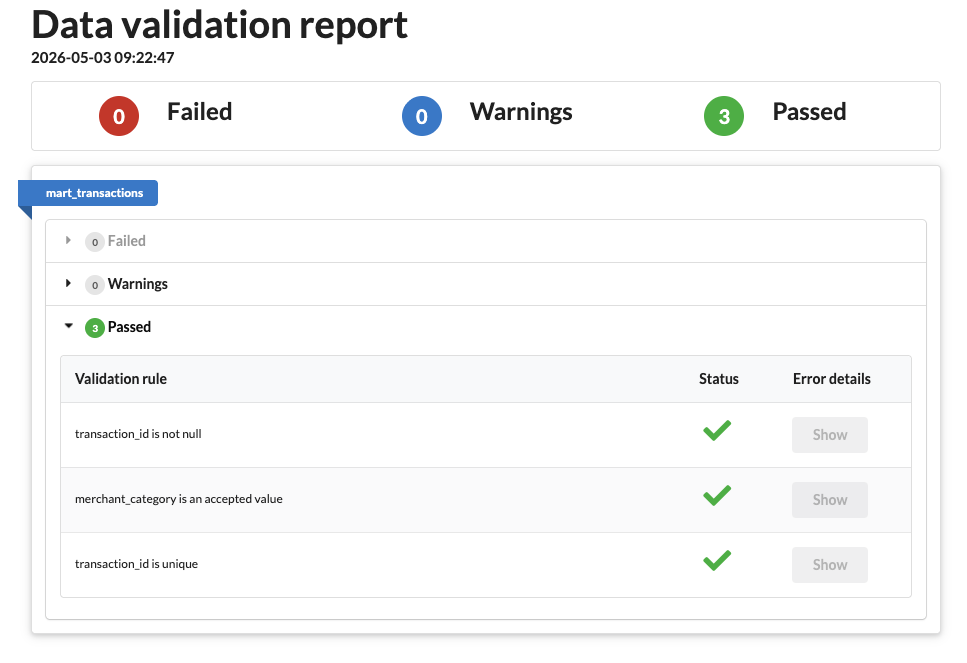 Successful {targets} + {data.validator} run
otherwise a failure is reported
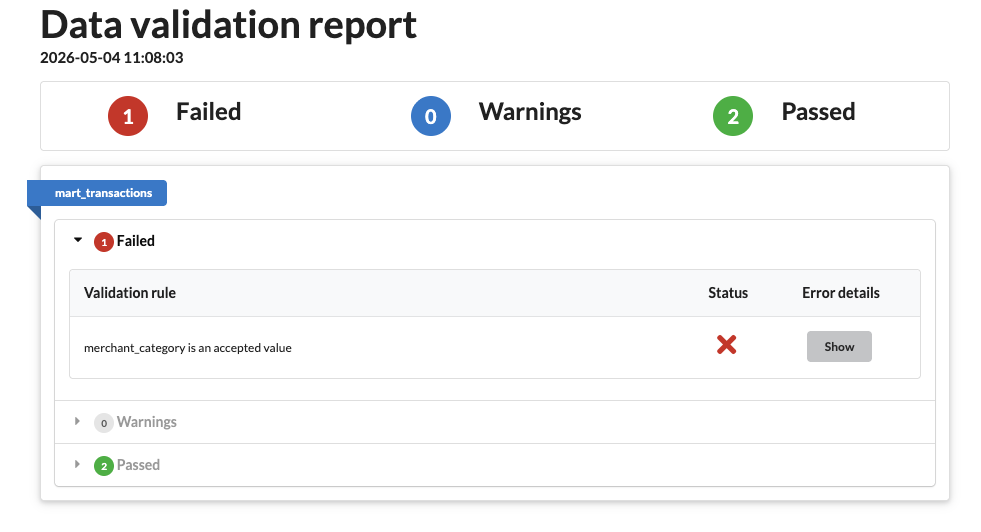 Errored {targets} + {data.validator} run
and clicking on ‘Show’ opens a table of the offending results.
Analysis
What’s the point of organising this data if we’re not going to do something with it? This is where I start to really wonder if {targets} maybe has a bigger picture in mind when it connects up the data, because while dbt will do all of the processing in SQL, R will happily continue to do the analysis.
I think this is where a separation of concerns becomes necessary, and that depends on the scale of the data involved. While you or I working on a small project might be very happy to tie the analysis into the data preparation all in one place, Netflix probably wants to segregate the data processing and analysis steps into entirely different divisions, so tying a bow on the cleaned data and letting analysts pick it up from a database makes a lot more sense.
For my example, let’s say I’m interested in analysing which categories have out of the ordinary amounts of spend in a given month - have I spent more on groceries this month? To do that, I want to calculate the average spend in each category each month plus the variation and identify when the spend is more than a standard deviation away from the average.
-
Given that this needs the ‘final’ tables, it belongs in the
models/martsfolder. There is ananalysis/folder in the dbt project by default, but that’s for ad-hoc SQL queries that need to useref()but don’t necessarily produce anything one wishes to persist.Calculating the standard deviations relies on DuckDB’s helpers, which I don’t even want to consider writing in bare SQL myself. In
models/mart/mart_category_outliers.sql:with monthly as ( select * from {{ ref('mart_category_trends') }} ), stats as ( select merchant_category, avg(total_aud) as mean_spend, stddev_samp(total_aud) as sd_spend, count(*) as n_months from monthly where total_aud > 0 group by 1 having count(*) > 1 -- need >1 observation for stddev ), outliers as ( select m.month, m.merchant_category, m.total_aud, s.mean_spend, m.total_aud - s.mean_spend as deviation, (m.total_aud - s.mean_spend) / s.sd_spend as z_score from monthly m inner join stats s using (merchant_category) where m.total_aud > 0 and abs((m.total_aud - s.mean_spend) / s.sd_spend) > 1 ) select * from outliers order by abs(z_score) descThis creates a new table in the database with the results.
-
The
sd()function in R is no stranger to anyone who’s done stats, and it drops into this code cleanly because {dplyr} translates SQL, and supports DuckDBmonthly_outliers <- function(mart_monthly) { spend <- mart_monthly |> filter(total_spend_aud > 0) stats <- spend |> group_by(merchant_category) |> summarise( mean_spend = mean(total_spend_aud), sd_spend = sd(total_spend_aud), n_months = n(), .groups = "drop" ) |> filter(n_months > 1) # need >1 observation for sd spend |> inner_join(stats, by = "merchant_category") |> mutate( z_score = (total_spend_aud - mean_spend) / sd_spend, deviation = total_spend_aud - mean_spend ) |> filter(abs(z_score) > 1) |> arrange(desc(abs(z_score))) |> select( month, merchant_category, total_spend_aud, mean_spend, deviation, z_score ) }which one can examine by asking {dbplyr} to explain how it’s working
dplyr::copy_to(
  DBI::dbConnect(duckdb::duckdb()),
  data.frame(x = c(2, 3, 1, 5, 4)),
  "example"
) |>
  dplyr::summarise(sd_x = sd(x, na.rm = TRUE)) |>
  dplyr::show_query()
## <SQL> ## SELECT STDDEV(x) AS sd_x ## FROM examplewhich shows that it uses the alias
STDDEV(x).
The Complete Workflow
That’s all the pieces I need to push data in the exported CSVs through the pipe and produce a database of monthly aggregated, categorised totals. Here’s how it looks in terms of the two tools.
-
The file structure is perhaps best seen in the
docswebsite (see the next section), but essentially the files inmodelsdefine the workflowmodels ├── intermediate │ ├── int_monthly_balances.sql │ └── int_transactions_categorised.sql ├── marts │ ├── mart_category_outliers.sql │ ├── mart_category_trends.sql │ ├── mart_transactions.sql │ └── schema.yml └── staging ├── sources.yml ├── stg_bank.sql ├── stg_cc.sql └── stg_transactions.sqlThroughout the dbt steps I’ve detailed here, each
.sqlmodel produced a corresponding table in the DuckDB database. Runninguv run dbt buildruns through the DAG identifying what needs to be run before what, then runs all the steps in order. An example of this running well looks like
01:51:09  Found 1 seed, 8 models, 4 data tests, 2 sources, 591 macros
01:51:09
01:51:09  Concurrency: 1 threads (target='dev')
01:51:09
01:51:09  1 of 13 START sql view model main.stg_bank ..................................... [RUN]
01:51:09  1 of 13 OK created sql view model main.stg_bank ................................ [OK in 0.04s]
01:51:09  2 of 13 START sql view model main.stg_cc ....................................... [RUN]
01:51:09  2 of 13 OK created sql view model main.stg_cc .................................. [OK in 0.02s]
01:51:09  3 of 13 START seed file main.seed_merchants .................................... [RUN]
01:51:09  3 of 13 OK loaded seed file main.seed_merchants ................................ [INSERT 402 in 0.02s]
01:51:09  4 of 13 START sql view model main.stg_transactions ............................. [RUN]
01:51:09  4 of 13 OK created sql view model main.stg_transactions ........................ [OK in 0.04s]
01:51:09  5 of 13 START sql view model main.int_transactions_categorised ................. [RUN]
01:51:09  5 of 13 OK created sql view model main.int_transactions_categorised ............ [OK in 0.03s]
01:51:09  6 of 13 START sql view model main.int_monthly_balances ......................... [RUN]
01:51:09  6 of 13 OK created sql view model main.int_monthly_balances .................... [OK in 0.03s]
01:51:09  7 of 13 START sql table model main.mart_category_trends ........................ [RUN]
01:51:09  7 of 13 OK created sql table model main.mart_category_trends ................... [OK in 0.22s]
01:51:09  8 of 13 START sql incremental model main.mart_transactions ..................... [RUN]
01:51:09  8 of 13 OK created sql incremental model main.mart_transactions ................ [OK in 0.26s]
01:51:09  9 of 13 START sql table model main.mart_category_outliers ...................... [RUN]
01:51:09  9 of 13 OK created sql table model main.mart_category_outliers ................. [OK in 0.01s]
01:51:09  10 of 13 START test assert_all_transactions_categorised ........................ [RUN]
01:51:09  10 of 13 WARN 34 assert_all_transactions_categorised ........................... [WARN 34 in 0.01s]
01:51:09  11 of 13 START test merchant_category_is_valid ................................. [RUN]
01:51:09  11 of 13 PASS merchant_category_is_valid ....................................... [PASS in 0.01s]
01:51:09  12 of 13 START test not_null_mart_transactions_transaction_id .................. [RUN]
01:51:09  12 of 13 PASS not_null_mart_transactions_transaction_id ........................ [PASS in 0.01s]
01:51:09  13 of 13 START test unique_mart_transactions_transaction_id .................... [RUN]
01:51:09  13 of 13 PASS unique_mart_transactions_transaction_id .......................... [PASS in 0.01s]
01:51:09
01:51:09  Finished running 1 incremental model, 1 seed, 2 table models, 4 data tests, 5 view models in 0 hours 0 minutes and 0.78 seconds (0.78s).
01:51:09
01:51:09  Completed with 1 warning:
01:51:09
01:51:09  Warning in test assert_all_transactions_categorised (tests/assert_all_transactions_categorised.sql)
01:51:09  Got 34 results, configured to warn if != 0
01:51:09
01:51:09    compiled code at target/compiled/slowbooks/tests/assert_all_transactions_categorised.sql
01:51:09
01:51:09  Done. PASS=12 WARN=1 ERROR=0 SKIP=0 NO-OP=0 TOTAL=13
The times on the left side are in UTC, and I can’t find a way to change that, which may be for the best - one can always convert to local after the fact if needed.
Everything completed with an
OKstatus except for the assertion which I’ve allowed toWARNbecause I haven’t categorised a handful of records.Looking at the resulting database, e.g. in a terminal, shows all the tables which have been created
duckdb slowbooks.duckdb DuckDB v1.5.2 (Variegata) Enter ".help" for usage hints. slowbooks D show tables; ┌──────────────────────────────┐ │ name │ │ varchar │ ├──────────────────────────────┤ │ int_monthly_balances │ │ int_transactions_categorised │ │ mart_category_outliers │ │ mart_category_trends │ │ mart_transactions │ │ seed_merchants │ │ stg_bank │ │ stg_cc │ │ stg_transactions │ └──────────────────────────────┘ -
The {targets} workflow is defined as a list within the
_targets.Rfilelist( # format="file" means targets re-runs downstream when file list or contents change tar_target( cc_files, cc_list, format = "file" ), tar_target( bank_files, bank_list, format = "file" ), tar_target(merchant_file, "../seeds/seed_merchants.csv", format = "file"), # Seeds tar_target(merchants, readr::read_csv(merchant_file, show_col_types = FALSE)), # Staging — passing file vectors directly so targets tracks dependencies correctly tar_target(stg_bank, stage_source(bank_files)), tar_target(stg_cc, stage_source(cc_files)), tar_target(stg_txns, stg_transactions(stg_bank, stg_cc)), # Intermediate tar_target(int_categorised, categorise_transactions(stg_txns, merchants)), tar_target(int_monthly, monthly_balances(int_categorised)), # Tests tar_target(validation, run_tests(int_categorised)), tar_target(is_violation, validation_violation(validation)), # Marts tar_target(mart_txns, mart_transactions(int_categorised)), tar_target(mart_monthly, mart_monthly_summary(mart_txns)), # Persist to DuckDB tar_target( db_mart_transactions, write_to_duckdb(mart_txns, "mart_transactions") ), tar_target( db_mart_monthly_summary, write_to_duckdb(mart_monthly, "mart_monthly_summary") ), # Analysis tar_target(outliers, monthly_outliers(mart_monthly)) )and running
tar_make()(or with the added validation,tar_make_catch()) from the working directory containing that file, the workflow is run+ bank_files dispatched ✔ bank_files completed [281ms, 74.42 kB] + cc_files dispatched ✔ cc_files completed [0ms, 137.82 kB] + merchant_file dispatched ✔ merchant_file completed [1ms, 15.89 kB] + stg_bank dispatched ✔ stg_bank completed [88ms, 12.98 kB] + stg_cc dispatched ✔ stg_cc completed [84ms, 18.60 kB] + merchants dispatched ✔ merchants completed [137ms, 7.33 kB] + stg_txns dispatched ✔ stg_txns completed [101ms, 71.10 kB] + int_categorised dispatched ✔ int_categorised completed [871ms, 86.06 kB] + mart_txns dispatched ✔ mart_txns completed [0ms, 86.06 kB] + validation dispatched ✔ validation completed [2.7s, 5.10 kB] + int_monthly dispatched ✔ int_monthly completed [3ms, 650 B] + mart_monthly dispatched ✔ mart_monthly completed [4ms, 2.78 kB] + db_mart_transactions dispatched ✔ db_mart_transactions completed [83ms, 70 B] + is_violation dispatched ✔ is_violation completed [1ms, 48 B] + db_mart_monthly_summary dispatched ✔ db_mart_monthly_summary completed [79ms, 72 B] + outliers dispatched ✔ outliers completed [10ms, 2.30 kB] ✔ ended pipeline [4.6s, 16 completed, 0 skipped]An important difference is that writing to the database only happened in two of the steps at the end, so the (distinct) database only contains those tables
duckdb targets/slowbooks_r.duckdb

DuckDB v1.5.2 (Variegata)
Enter ".help" for usage hints.
slowbooks_r D show tables;
┌──────────────────────┐
│         name         │
│       varchar        │
├──────────────────────┤
│ mart_monthly_summary │
│ mart_transactions    │
└──────────────────────┘
There’s nothing stopping me from also adding a
write_to_duckdb()(a function which just opens the database, writes a table, then closes) call for any of the other steps, but I was satisfied that I am building the same thing in both cases.
DAG / Visualisation / Docs
The similarity to a Makefile of these approaches depends on being able to
determine what has ‘changed’ and what is the same, and this is where the two
approaches differ. Both consider the workflow as a Directed Acyclic Graph (DAG)
with steps taking dependencies on previous steps or data sources. This means I
can visualise the workflow as a graph, but also makes for some important differences
between how things actually run.
-
Every time I run
dbt buildthe entire model is re-run. If the model is ‘incremental’ then it won’t need to do a fullCREATE TABLEor re-categorise existing records every time, but all of the steps will be re-run. This also makes for more complexity if I do want to re-categorise existing records, in which case I need to add--full-refreshto the build step.With the model defined I can visualise it by generating and serving the documentation site with
uv run dbt docs generate && uv run dbt docs serveThis builds a site locally hosted which includes all of the SQL code and a lineage graph showing how different pieces connect together
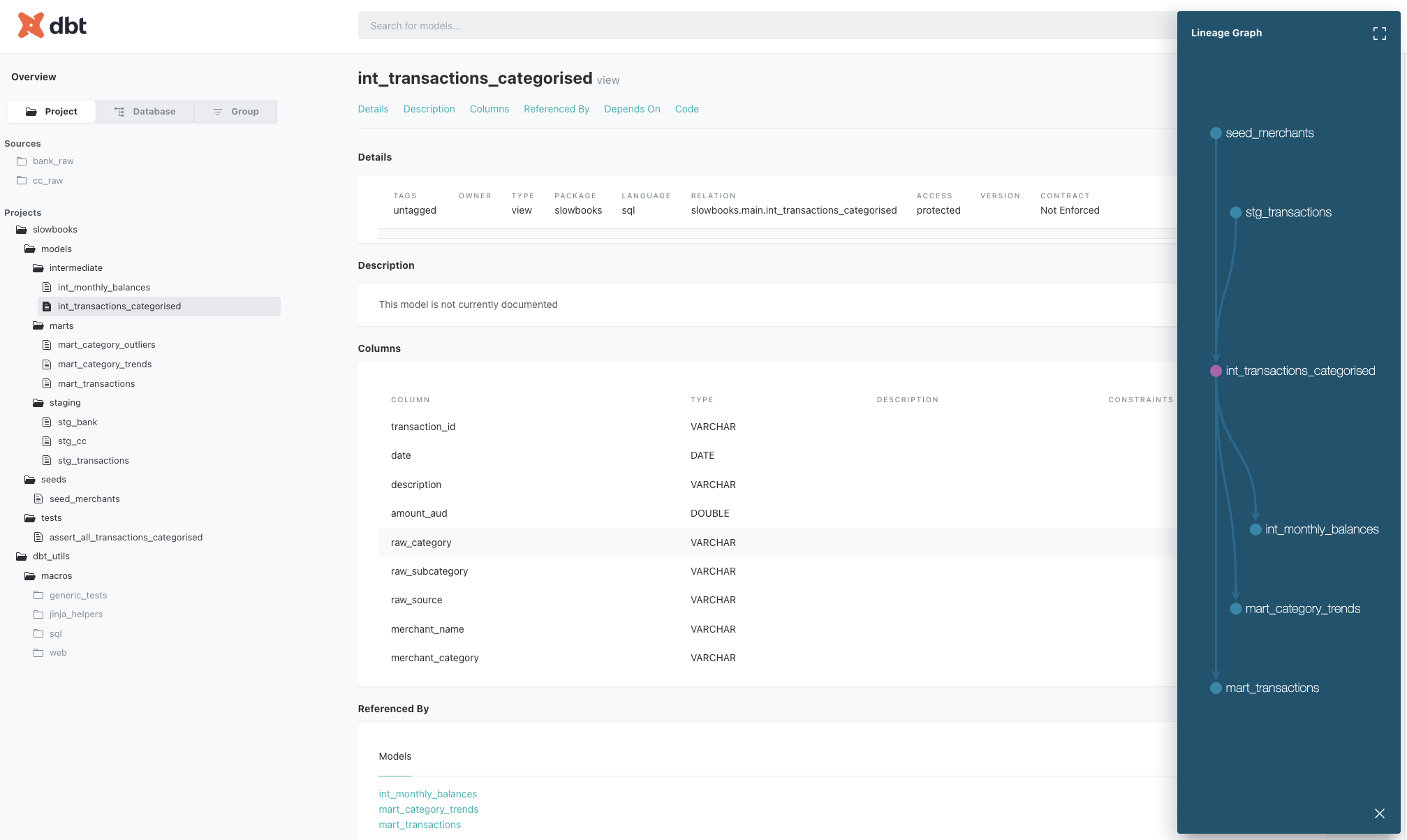 dbt docs site (click to embiggen)
Expanding this pane shows more of the DAG for the project, though not all of the connections
 dbt DAG for the whole slowbooks project (click to embiggen)
This is really nice, and shows how the data flows from the raw data to the final summary.
-
This is where I think {targets} may have an advantage over dbt – since the workflow considers a hash of the data objects to determine what has changed, even if the code remains the same, it can identify which steps of the DAG are invalidated, and can skip over any steps which don’t need to be re-run.
This is significant when the data you’re processing is no longer necessarily local to the machine running the pipeline. dbt performs the queries with SQL on the database (in this example the tables are written in DuckDB and materialised as views for downstream models), while the structure I’m using for {targets} here explicitly pulls in the data for R-native processing. I could make it more remote and use lazy
tbl()operations via {dbplyr}, but it’s a trade-off one needs to consider.A full DAG for the project can be produced in an editor able to render HTML such as RStudio or Positron, with
targets::tar_visnetwork()producing an interactive plot
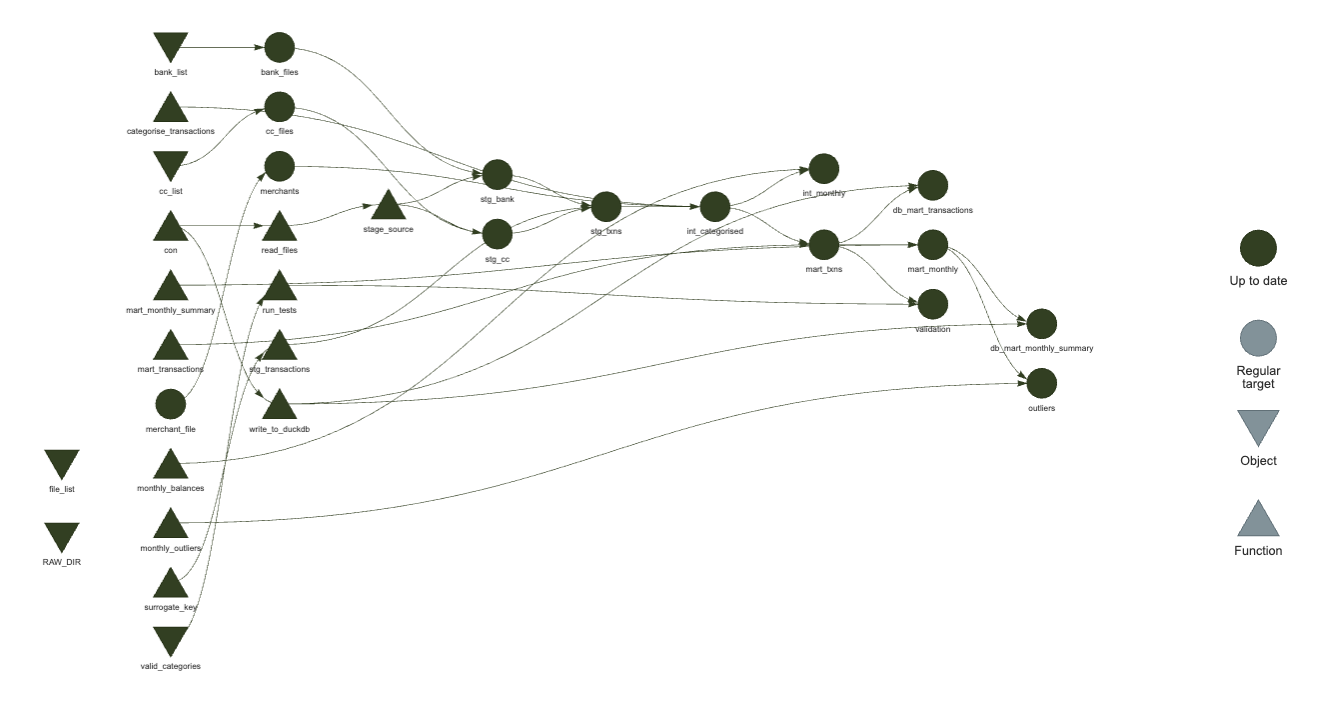 Up-to-date {targets} DAG visualisation (click to embiggen)
If I change some of the code in the mart definition, and re-evaluate just that function, then re-running
targets::tar_visnetwork()shows me which nodes are affected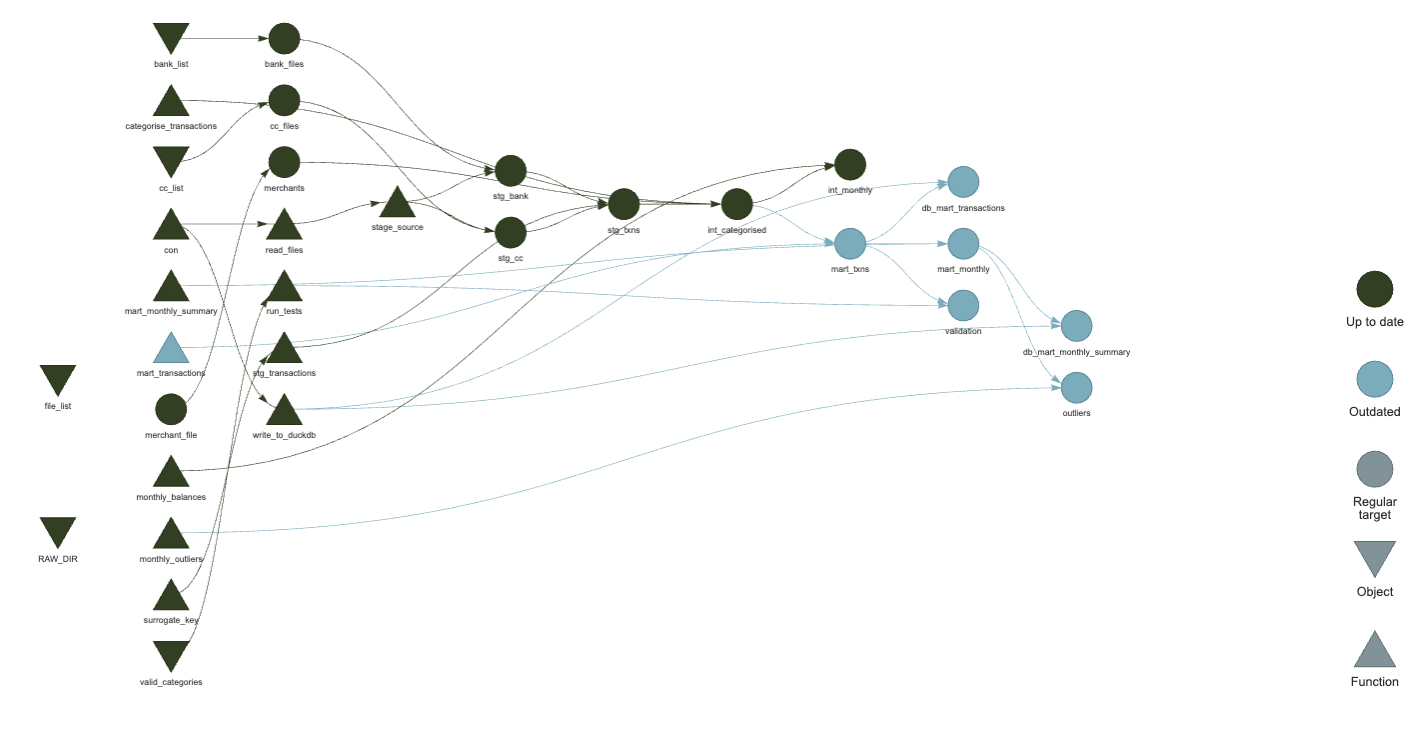 Invalidated {targets} DAG visualisation (click to embiggen)
(note the different colour of some nodes). This is fantastic!
What’s more, if I have a failing test during the validation, I can see what is downstream from that
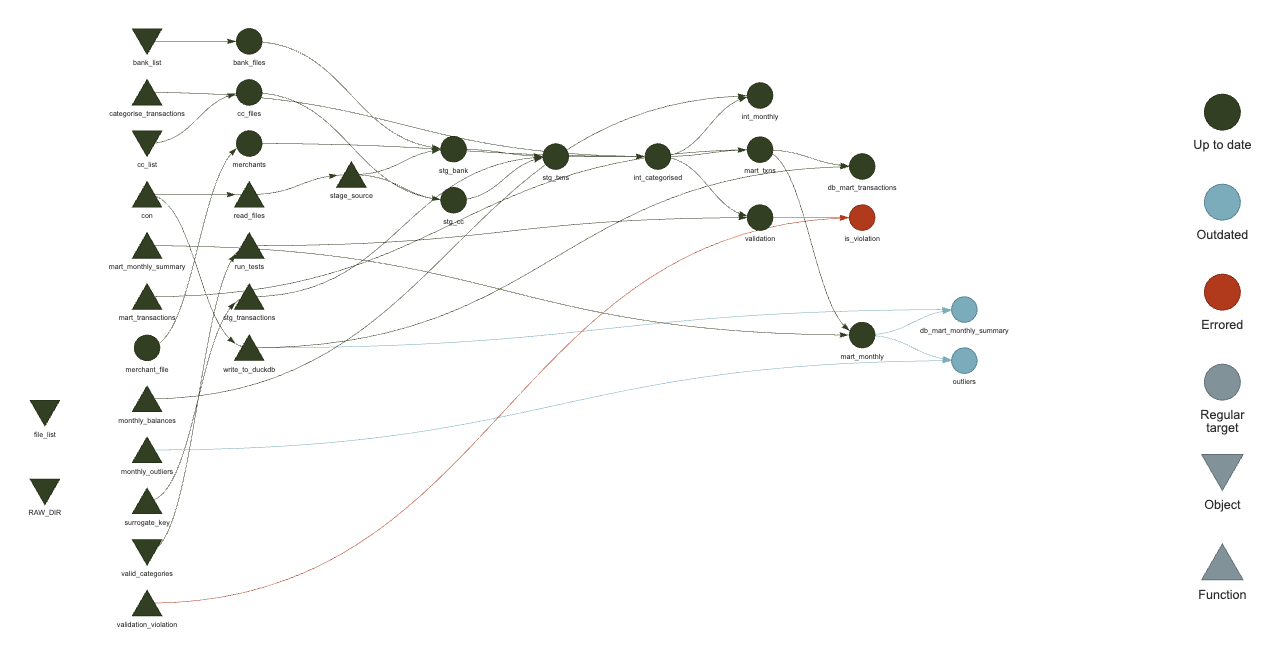 Failed validation in {targets} DAG (click to embiggen)
That did require following the article in the {data.validator} docs to define
validation_violation <- function(report) {
  violations_exist <- report$get_validations() %>%
    summarise(
      sum(num.violations, na.rm = TRUE) > 0
    ) %>%
    pull()
  if (isTRUE(violations_exist)) {
    rlang::abort(
      "Validation schema error",
      body = capture.output(report),
      class = "validation_violation"
    )
  }
  FALSE
}
and adding to the target
tar_target(is_violation, validation_violation(validation)),and instead of running
tar_make(), using atryCatch()tar_make_catch <- function() { tryCatch( tar_make(), validation_violation = function(e) { print(e) tar_visnetwork() } ) }Incredibly powerful stuff, right?
Exploration
I only built the exploration dashboard as part of the dbt project because I’ve built plenty of shiny apps - I wanted to see what Claude could build based on this database data source. It built a streamlit app which shows the monthly spend broken down by category, and I had it add filters for the various categories, tables of transactions, and the monthly outliers.
The dashboard works great, albeit not perfectly. It looks something like this
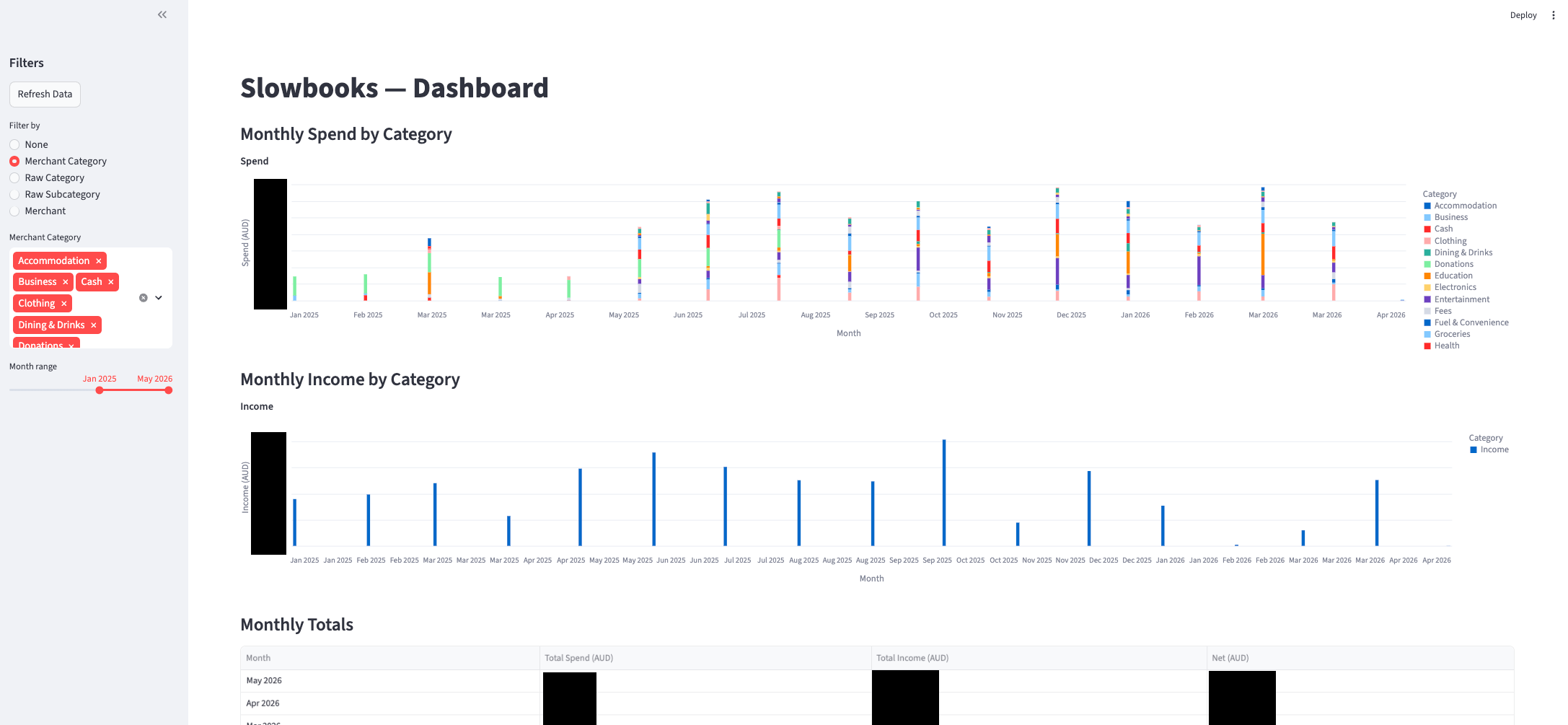
There’s obvious issues with it - not least that the legend is incomplete, but for the sort of exploration I wanted to try out, it’s a great starting point.
It reads the summary tables directly from the database, so the analysis doesn’t need to happen within the app – a nice separation of business logic and visualisation.
Comparison
As a final sanity check, I’ll confirm that I get the same number of transactions in the monthly trend tables which are saved to both databases, albeit with different names
duckdb slowbooks.duckdb -c "select sum(transaction_count) from mart_category_trends;"
┌────────────────────────┐
│ sum(transaction_count) │
│         int128         │
├────────────────────────┤
│                   2028 │
└────────────────────────┘

duckdb targets/slowbooks_r.duckdb -c "select sum(transaction_count) from mart_monthly_summary;"
┌────────────────────────┐
│ sum(transaction_count) │
│         int128         │
├────────────────────────┤
│                   2028 │
└────────────────────────┘
🎉
As for what I like and don’t like about each approach:
-
Language: I don’t reach for SQL as a primary language (it’s absolutely the second language everyone who codes with data should learn, in my opinion) so having to write everything in SQL myself doesn’t appeal so much to me. I’m very happy to be able to use {dplyr} more or less everywhere and have it write the SQL for me. On the other hand, I can see the value in moving to a language that’s closer to the data itself – the abstractions change over time ({dplyr} is notorious for this) so with fewer bells and whistles likely comes more stability. Provided the helper functions are available for things like basic statistics (e.g. in DuckDB) this doesn’t sound like too much of a downside. Doing a bit more research, it seems that dbt does support using Python for models, provided the adapter supports it (which
dbt-duckdbdoes), so that’s a big win for those more familiar with Python, although I am under the impression that not everything works exactly the same for these models. -
Connection: I appreciate the massive leg-up that dbt offers in terms of handling connections to sources via extensions (e.g.
dbt-duckdb). I’m sure if you’re not used to that then it looks like magic, but those familiar with working with databases via {dbplyr} and {DBI} it loses some of the wonder. Importantly, the dbt SQL code all runs within the database - downstream models rely on views so the data never really leaves the database. The R version could get closer to this, but I suspect the more common use-case is to actually pull down all of the data in which case it’s likely to fit within RAM. -
Version Control: For people not used to committing their work, again this seems like a huge step up, but R users get taught fairly early on to work with git and track their code, even if it’s just scripts. Someone used to just throwing SQL at a database from a terminal might be rightly amazed at the benefits opened up by tracking code this way, but for me it’s the default state.
-
Layout: dbt has so many files for even a simple project that my VSCode file explorer runs off the screen. {targets} has everything in a single file. This could be organised more like dbt with a liberal use of
source()calls at the top of_targets.R, say for each model and some utils. -
Interrogation: Perhaps there’s some more tooling I’m not aware of, but the {targets} visualisation of the DAG is a clear winner for me. Part of the tradeoff between ‘run everything locally’ and ‘run everything remotely’ is that I can inspect the intermediate data in the {targets} workflow with
tar_read(id)and see what’s happening. I can read the generated table in the database, but for smallish data being able to just crack it open and have a look wins for me.
Other Solutions
While I’ve focused on this comparison between dbt and {targets}, these aren’t the only players in the game. I’m aware of Airflow, at least in the sense that it can ingest dbt pipelines and schedule them. For the Python folks there’s also prefect and dagster, the latter of which also has an R ingestion route in the form of dagsterpipes. A purely R solution is maestro which appears to target (pun intended) data coming from an API or database for which {targets} can’t identify the ‘up-to-date-ness’ (since that involves a hash of the file).
Conclusion
I’ve vastly grown my understanding of both dbt and {targets} and have a much greater appreciation for what goes into using each of these to move and curate data. Plus, now I have a cool new toy I’ve built to explore my finances. I’m not sharing the code itself – partly so that I don’t risk committing my own finance data by accident, and partly because what I’ve done here isn’t anything you need to build on; if you’re interested in learning either or both of these tools, I recommend you do what I did and build a toy project.
I’m interested to hear what you think of this comparison – have I overlooked some significant difference or similarity? Some use-case where one of them would really shine over the other? Have I misrepresented something? I’m here to learn, so by all means please do let me know. And if you’re looking for someone with a history of programming and data who digs into projects this way, I’m on the market for opportunities.
As always, I can be found on Mastodon and the comment section below.
devtools::session_info()
## ─ Session info ───────────────────────────────────────────────────────────────
##  setting  value
##  version  R version 4.5.3 (2026-03-11)
##  os       macOS Tahoe 26.3.1
##  system   aarch64, darwin20
##  ui       X11
##  language (EN)
##  collate  en_US.UTF-8
##  ctype    en_US.UTF-8
##  tz       Australia/Adelaide
##  date     2026-05-04
##  pandoc   3.6.3 @ /Applications/RStudio.app/Contents/Resources/app/quarto/bin/tools/aarch64/ (via rmarkdown)
##  quarto   1.7.31 @ /usr/local/bin/quarto
##
## ─ Packages ───────────────────────────────────────────────────────────────────
##  package     * version date (UTC) lib source
##  blob          1.3.0   2026-01-14 [1] CRAN (R 4.5.2)
##  blogdown      1.23    2026-01-18 [1] CRAN (R 4.5.2)
##  bookdown      0.46    2025-12-05 [1] CRAN (R 4.5.2)
##  bslib         0.10.0  2026-01-26 [1] CRAN (R 4.5.2)
##  cachem        1.1.0   2024-05-16 [1] CRAN (R 4.5.0)
##  cli           3.6.5   2025-04-23 [1] CRAN (R 4.5.0)
##  DBI           1.3.0   2026-02-25 [1] CRAN (R 4.5.2)
##  dbplyr        2.5.2   2026-02-13 [1] CRAN (R 4.5.2)
##  devtools      2.4.6   2025-10-03 [1] CRAN (R 4.5.0)
##  digest        0.6.39  2025-11-19 [1] CRAN (R 4.5.2)
##  dplyr         1.2.1   2026-04-03 [1] CRAN (R 4.5.2)
##  duckdb        1.5.2   2026-04-13 [1] CRAN (R 4.5.2)
##  ellipsis      0.3.2   2021-04-29 [1] CRAN (R 4.5.0)
##  evaluate      1.0.5   2025-08-27 [1] CRAN (R 4.5.0)
##  fastmap       1.2.0   2024-05-15 [1] CRAN (R 4.5.0)
##  fs            1.6.7   2026-03-06 [1] CRAN (R 4.5.2)
##  generics      0.1.4   2025-05-09 [1] CRAN (R 4.5.0)
##  glue          1.8.1   2026-04-17 [1] CRAN (R 4.5.2)
##  htmltools     0.5.9   2025-12-04 [1] CRAN (R 4.5.2)
##  jquerylib     0.1.4   2021-04-26 [1] CRAN (R 4.5.0)
##  jsonlite      2.0.0   2025-03-27 [1] CRAN (R 4.5.0)
##  knitr         1.51    2025-12-20 [1] CRAN (R 4.5.2)
##  lifecycle     1.0.5   2026-01-08 [1] CRAN (R 4.5.2)
##  magrittr      2.0.4   2025-09-12 [1] CRAN (R 4.5.0)
##  memoise       2.0.1   2021-11-26 [1] CRAN (R 4.5.0)
##  otel          0.2.0   2025-08-29 [1] CRAN (R 4.5.0)
##  pillar        1.11.1  2025-09-17 [1] CRAN (R 4.5.0)
##  pkgbuild      1.4.8   2025-05-26 [1] CRAN (R 4.5.0)
##  pkgconfig     2.0.3   2019-09-22 [1] CRAN (R 4.5.0)
##  pkgload       1.5.0   2026-02-03 [1] CRAN (R 4.5.2)
##  purrr         1.2.2   2026-04-10 [1] CRAN (R 4.5.2)
##  R6            2.6.1   2025-02-15 [1] CRAN (R 4.5.0)
##  remotes       2.5.0   2024-03-17 [1] CRAN (R 4.5.0)
##  rlang         1.1.7   2026-01-09 [1] CRAN (R 4.5.2)
##  rmarkdown     2.30    2025-09-28 [1] CRAN (R 4.5.0)
##  rstudioapi    0.18.0  2026-01-16 [1] CRAN (R 4.5.2)
##  sass          0.4.10  2025-04-11 [1] CRAN (R 4.5.0)
##  sessioninfo   1.2.3   2025-02-05 [1] CRAN (R 4.5.0)
##  tibble        3.3.1   2026-01-11 [1] CRAN (R 4.5.2)
##  tidyselect    1.2.1   2024-03-11 [1] CRAN (R 4.5.0)
##  usethis       3.2.1   2025-09-06 [1] CRAN (R 4.5.0)
##  vctrs         0.7.1   2026-01-23 [1] CRAN (R 4.5.2)
##  withr         3.0.2   2024-10-28 [1] CRAN (R 4.5.0)
##  xfun          0.56    2026-01-18 [1] CRAN (R 4.5.2)
##  yaml          2.3.12  2025-12-10 [1] CRAN (R 4.5.2)
##
##  [1] /Library/Frameworks/R.framework/Versions/4.5-arm64/Resources/library
##
## ──────────────────────────────────────────────────────────────────────────────